

The latest edition of SQL Server comes with plenty of enhancements, and some we are particularly looking forward to. Updates to TempDB in SQL Server 2025 are one of our (… or my) favourites. We’re not talking a redesign of TempDB but rather some noticeable improvements that the community has been shouting out for. Let’s dig into them.
| Eager to learn more about SQL Server 2025? Register for our February webinar, which focuses on the changes to infrastructure in this latest edition of the platform. |
TempDB Space Governance
This is the big one. We’re going to do extensive testing on this, but it looks extremely promising. In SQL Server 2025, Resource Governor can now limit how much TempDB space a workload is allowed to use. That means:
- One bad report can’t eat all of TempDB
- ETL jobs can’t bully OLTP workloads
- You can finally put hard limits on temp space usage
Why this matters
You may have run into the issue where TempDB gets filled by somebody running a huge reporting query. This fills the TempDB drive and brings down the production server. Sometimes you can’t help users from being users. This is usually compounded in virtualised environments if you’re using something like the AWS Instance Store when you can’t increase the size of this drive other than increasing your instance size (and cost).
Before 2025, Resource Governor could manage CPU and memory, but TempDB was the Wild West. Now it’s fenced in.
If a workload hits its TempDB limit:
- The request fails
- TempDB stays healthy
- The rest of the server keeps working
Example: Limit TempDB usage for a workload group
Note: There are some requirements for your TempDB configuration:


-- Enable Resource Governor

ALTER RESOURCE GOVERNOR RECONFIGURE

GO

-- Create a workload group with a TempDB limit of 25%

CREATE WORKLOAD GROUP ReportingGroup

WITH (GROUP_MAX_TEMPDB_DATA_PERCENT = 25)

GO

ALTER RESOURCE GOVERNOR RECONFIGURE

GO
By doing this you prevent the new workload group we created for using more than 25% of the TempDB space.
Accelerated Database Recovery (ADR) in TempDB
ADR has been around for a while in user databases, but the fact that we can now use it on TempDB comes with some promising opportunities, but what is ADR exactly?
ADR is basically SQL Server’s way of cleaning up messes way faster. Instead of doing long painful rollbacks that make you stare at “rolling back transaction…” like it’s judging your life choices, ADR keeps a lightweight version store so SQL Server can undo work almost instantly.
That means cancelled queries don’t hang around forever, crash recovery is dramatically quicker, and the transaction log doesn’t balloon while SQL Server cleans up after a bad decision. Think of ADR as giving SQL Server an “undo” button that actually works.
What changes with ADR on TempDB?
- Cancelled queries clean up fast
- TempDB log truncates more aggressively
- Less waiting around for rollback to finish
If you’ve ever cancelled a big query and watched TempDB sit there bloated for minutes… yeah, this helps.
Enabling ADR for TempDB
It’s a simple command to enable ADR for any database:
ALTER DATABASE [tempdb]

SET ACCELERATED_DATABASE_RECOVERY = ON

GO
For tempdb, you’ll have to restart the SQL Service for this to take effect (because tempdb is recreated from scratch when you restart the SQL Service).
You can check whether ADR is enabled for tempdb by looking at sys.databases:
SELECT name, is_accelerated_database_recovery_on FROM sys.databases WHERE name = 'tempdb'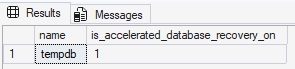
Why you should turn this on
TempDB is famously described as the public toilet of SQL Server, and this setting makes clean up a whole lot easier!
Fewer TempDB Headaches
SQL Server 2025 also brings a bunch of quieter improvements that indirectly help TempDB:
- Better memory grant feedback → fewer spills
- Smarter throttling for runaway queries
- Reduced contention under high concurrency
None of these are “headline features,” but together they mean:
- Less TempDB churn
- Fewer surprises
- Smoother performance under load
Final Thoughts
These are enhancements to TempDB in SQL Server 2025, rather than re-writes of the fundamentals. Honestly, that’s a good thing. It gives you, as the DBA, extra control over tempdb on your servers and gives an overall better performing system. Definitely test these things in your test environment first though!