
This is a real customer problem that we’ve dealt with, but it was “edge case” enough that we thought it worth a blog post. Our hope is that anyone else having the same problem with a bloated templog can find this post and it can help solve a mystery for you.
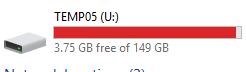
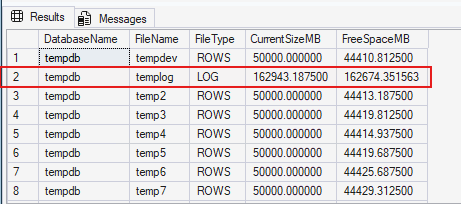
The specific issue is that the tempdb log file for a specific customer was filling up, growing, and then filling the drive. There was no obvious cause. We did the usual, checking which processes were using tempdb space with sys.dm_db_session_space_usage, but there weren’t any using anywhere near the amount of pages that would explain the file filling. But it kept growing.
Something else: When checking sp_WhoIsActive, we saw hundreds of sleeping transactions which weren’t actually using any resources. They were just sitting there open, which is not normal behaviour for queries/connections to SQL Server.
Version Store
I’m going to give away the ending here. This issue was indeed caused by an open sleeping transaction, but it was not directly related to the actual process running. This environment has Read Committed Snapshot Isolation (RCSI) enabled. The open query was causing any data changes to be logged to the version store. This is normal. However, this — combined with the extremely long duration of the offending query — is what caused the version store to grow out of control.
By querying sys.dm_tran_active_snapshot_database_transactions, we can see a list of active transactions that are logging data to the version store. By using the transaction_id, we can query sys.dm_tran_active_transactions to find further details of our problem query here.

The simplest thing to do next is to then compare this with the output of sp_WhoIsActive and check the start_time of the query to find what our likely suspect is:
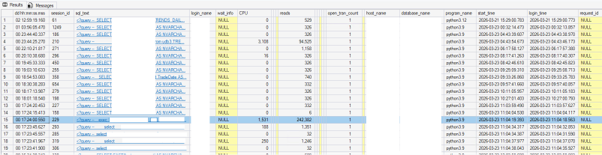
We can see that this query started at 11:04:19, which is 400ms off the time reported in the first query. But that’s close enough to help us find it.
The tricky part here is that none of the usual DMVs around file usage would uncover this. It’s a very niche DMV to check, so it’s very easily overlooked.
Once we killed this connection, we saw the templog file become empty, which allowed us to shrink it back to its original size. Voila!
Possible Solutions
We’ve got a couple of options here: the ‘correct’ way and a stopgap that you can use to beat active connections into submission. Pick your poison.
Option 1: Close connections correctly
The entire issue here is ultimately down to the fact that connections are not being closed when they’re no longer needed. There are various ways you can close these connections, depending on what language you’re writing your queries in. Whatever language you’re using, we should be closing those connections.
Don’t even get me started on worker thread exhaustion here too. That’s a whole different blog post.
Option 2: A Reactive Agent Job
The other approach is reactive: a scheduled Agent job that finds sessions which have been open too long, doing too little, and ends them.
We check a few things here:
- Is the templog file more than 75% full? If it’s not, then we take no action.
- Do we have any running transactions using version store that have been going for more than 120 seconds? This number is arbitrary and is very specific to your environment. Feel free to set this threshold to whatever feels appropriate for you.
- Find the session_id that relates to this transaction_id.
- Verify this session_id is not a system process and it’s also not us.
- Once we have that, we issue a kill command using dynamic SQL on this offending SPID.
All the while, we are logging information so that we can interrogate it afterwards. We definitely don’t want this type of query acting silently!
The Script
SET NOCOUNT ON;
-------------------------------------------------------------------
-- CONFIG
-------------------------------------------------------------------
DECLARE @ThresholdSeconds     INT   = 120;
DECLARE @TempdbLogPctTrigger  FLOAT = 75.0;   -- only act if tempdb log is >= this % full
-------------------------------------------------------------------
-- OPTIONAL: Persistent log table (created once if it doesn't exist)
-------------------------------------------------------------------
IF OBJECT_ID('dbo.LongTransactionKillLog', 'U') IS NULL
BEGIN
    CREATE TABLE dbo.LongTransactionKillLog
    (
        LogId            INT IDENTITY(1,1) PRIMARY KEY,
        LogTimeUtc       DATETIME2 DEFAULT SYSUTCDATETIME(),
        TransactionId    BIGINT NULL,
        SessionId        INT NULL,
        ElapsedSeconds   INT NULL,
        TempdbLogPctUsed FLOAT NULL,
        LoginName        SYSNAME NULL,
        HostName         SYSNAME NULL,
        ProgramName      NVARCHAR(256) NULL,
        LastQueryText    NVARCHAR(MAX) NULL,
        Action           VARCHAR(50),
        Message          NVARCHAR(4000)
    );
END;
-------------------------------------------------------------------
-- 0. Check tempdb log space usage — gate everything on this
-------------------------------------------------------------------
DECLARE @TempdbLogPctUsed FLOAT;
DECLARE @LogSpace TABLE
(
    DatabaseName          SYSNAME,
    LogSizeMB             FLOAT,
    LogSpaceUsedPct       FLOAT,
    Status                INT
);
INSERT INTO @LogSpace
EXEC ('DBCC SQLPERF(LOGSPACE)');
SELECT @TempdbLogPctUsed = LogSpaceUsedPct
FROM @LogSpace
WHERE DatabaseName = 'tempdb';
IF @TempdbLogPctUsed IS NULL
BEGIN
    INSERT INTO dbo.LongTransactionKillLog (TempdbLogPctUsed, Action, Message)
    VALUES (NULL, 'ABORTED', 'Could not determine tempdb log space usage via DBCC SQLPERF(LOGSPACE).');
    PRINT 'Could not determine tempdb log space usage. Aborting.';
    RETURN;
END;
PRINT 'Tempdb log space used: ' + CAST(@TempdbLogPctUsed AS VARCHAR(10)) + '%';
IF @TempdbLogPctUsed < @TempdbLogPctTrigger BEGIN INSERT INTO dbo.LongTransactionKillLog (TempdbLogPctUsed, Action, Message) VALUES (@TempdbLogPctUsed, 'NO_ACTION', 'Tempdb log usage (' + CAST(@TempdbLogPctUsed AS VARCHAR(10)) + '%) below trigger threshold of ' + CAST(@TempdbLogPctTrigger AS VARCHAR(10)) + '%. No action taken.'); PRINT 'Tempdb log usage below ' + CAST(@TempdbLogPctTrigger AS VARCHAR(10)) + '% threshold. No action taken.'; RETURN; END; PRINT 'Tempdb log usage exceeds ' + CAST(@TempdbLogPctTrigger AS VARCHAR(10)) + '% threshold — proceeding with transaction check.'; ------------------------------------------------------------------- -- 1. Find the longest-running transaction over the threshold ------------------------------------------------------------------- DECLARE @TransactionId BIGINT; DECLARE @ElapsedSeconds INT; SELECT TOP 1 @TransactionId = transaction_id, @ElapsedSeconds = elapsed_time_seconds FROM sys.dm_tran_active_snapshot_database_transactions WHERE elapsed_time_seconds >= @ThresholdSeconds
ORDER BY elapsed_time_seconds DESC;
IF @TransactionId IS NULL
BEGIN
    INSERT INTO dbo.LongTransactionKillLog (TransactionId, SessionId, ElapsedSeconds, TempdbLogPctUsed, Action, Message)
    VALUES (NULL, NULL, NULL, @TempdbLogPctUsed, 'NO_ACTION',
            'Tempdb log over threshold, but no transaction found exceeding ' + CAST(@ThresholdSeconds AS VARCHAR(10)) + ' second duration threshold.');
    PRINT 'No transaction found exceeding ' + CAST(@ThresholdSeconds AS VARCHAR(10)) + ' second threshold.';
    RETURN;
END;
PRINT 'Longest transaction found: transaction_id = ' + CAST(@TransactionId AS VARCHAR(20))
    + ', elapsed_time_seconds = ' + CAST(@ElapsedSeconds AS VARCHAR(10));
-------------------------------------------------------------------
-- 2. Resolve transaction_id -> session_id
-------------------------------------------------------------------
DECLARE @SessionId INT;
SELECT TOP 1
    @SessionId = st.session_id
FROM sys.dm_tran_session_transactions st
WHERE st.transaction_id = @TransactionId;
IF @SessionId IS NULL
BEGIN
    INSERT INTO dbo.LongTransactionKillLog (TransactionId, SessionId, ElapsedSeconds, TempdbLogPctUsed, Action, Message)
    VALUES (@TransactionId, NULL, @ElapsedSeconds, @TempdbLogPctUsed, 'NO_ACTION', 'Could not resolve session_id for transaction_id.');
    PRINT 'Could not resolve a session_id for transaction_id ' + CAST(@TransactionId AS VARCHAR(20)) + '.';
    RETURN;
END;
-------------------------------------------------------------------
-- 3. Pull session context for logging (before kill, while it's alive)
-------------------------------------------------------------------
DECLARE @LoginName   SYSNAME;
DECLARE @HostName    SYSNAME;
DECLARE @ProgramName NVARCHAR(256);
DECLARE @LastQuery   NVARCHAR(MAX);
SELECT
    @LoginName   = s.login_name,
    @HostName    = s.host_name,
    @ProgramName = s.program_name
FROM sys.dm_exec_sessions s
WHERE s.session_id = @SessionId;
SELECT TOP 1
    @LastQuery = t.text
FROM sys.dm_exec_requests r
CROSS APPLY sys.dm_exec_sql_text(r.sql_handle) t
WHERE r.session_id = @SessionId;
IF @LastQuery IS NULL
BEGIN
    SELECT TOP 1
        @LastQuery = t.text
    FROM sys.dm_exec_connections c
    CROSS APPLY sys.dm_exec_sql_text(c.most_recent_sql_handle) t
    WHERE c.session_id = @SessionId;
END;
-------------------------------------------------------------------
-- 4. Safety checks — don't kill system sessions or yourself
-------------------------------------------------------------------
IF @SessionId <= 50
BEGIN
    INSERT INTO dbo.LongTransactionKillLog
        (TransactionId, SessionId, ElapsedSeconds, TempdbLogPctUsed, LoginName, HostName, ProgramName, LastQueryText, Action, Message)
    VALUES
        (@TransactionId, @SessionId, @ElapsedSeconds, @TempdbLogPctUsed, @LoginName, @HostName, @ProgramName, @LastQuery,
         'ABORTED', 'Refused to kill: session_id <= 50 is a system session.');
    PRINT 'Refusing to kill session_id ' + CAST(@SessionId AS VARCHAR(10)) + ' — this is a system session.';
    RETURN;
END;
IF @SessionId = @@SPID
BEGIN
    INSERT INTO dbo.LongTransactionKillLog
        (TransactionId, SessionId, ElapsedSeconds, TempdbLogPctUsed, LoginName, HostName, ProgramName, LastQueryText, Action, Message)
    VALUES
        (@TransactionId, @SessionId, @ElapsedSeconds, @TempdbLogPctUsed, @LoginName, @HostName, @ProgramName, @LastQuery,
         'ABORTED', 'Refused to kill: target session is the current session.');
    PRINT 'Refusing to kill session_id ' + CAST(@SessionId AS VARCHAR(10)) + ' — that is this session.';
    RETURN;
END;
-------------------------------------------------------------------
-- 5. Log intent, then KILL
-------------------------------------------------------------------
INSERT INTO dbo.LongTransactionKillLog
    (TransactionId, SessionId, ElapsedSeconds, TempdbLogPctUsed, LoginName, HostName, ProgramName, LastQueryText, Action, Message)
VALUES
    (@TransactionId, @SessionId, @ElapsedSeconds, @TempdbLogPctUsed, @LoginName, @HostName, @ProgramName, @LastQuery,
     'KILL_ATTEMPT', 'About to issue KILL command.');
PRINT 'Killing session_id ' + CAST(@SessionId AS VARCHAR(10))
    + ' (transaction_id ' + CAST(@TransactionId AS VARCHAR(20)) + ', '
    + CAST(@ElapsedSeconds AS VARCHAR(10)) + 's elapsed, tempdb log ' + CAST(@TempdbLogPctUsed AS VARCHAR(10))
    + '% full, login: ' + ISNULL(@LoginName, 'N/A') + ')';
BEGIN TRY
    DECLARE @Sql NVARCHAR(100) = N'KILL ' + CAST(@SessionId AS NVARCHAR(10));
    EXEC (@Sql);
    UPDATE dbo.LongTransactionKillLog
    SET Action = 'KILL_ISSUED', Message = 'KILL command executed successfully.'
    WHERE LogId = SCOPE_IDENTITY();
    PRINT 'KILL command issued for session_id ' + CAST(@SessionId AS VARCHAR(10)) + '.';
END TRY
BEGIN CATCH
    DECLARE @ErrMsg NVARCHAR(4000) = ERROR_MESSAGE();
    INSERT INTO dbo.LongTransactionKillLog
        (TransactionId, SessionId, ElapsedSeconds, TempdbLogPctUsed, LoginName, HostName, ProgramName, LastQueryText, Action, Message)
    VALUES
        (@TransactionId, @SessionId, @ElapsedSeconds, @TempdbLogPctUsed, @LoginName, @HostName, @ProgramName, @LastQuery,
         'KILL_FAILED', @ErrMsg);
    PRINT 'Failed to kill session_id ' + CAST(@SessionId AS VARCHAR(10)) + ': ' + @ErrMsg;
END CATCH;
Bloated templog, Solved
So there you have it! If you want to run this regularly, schedule the whole thing as a SQL Agent job step. For the first couple of weeks running this, I recommend you leave @DryRun = 1 before flipping it to actually kill anything. That log table alone is worth its weight in gold before you ever terminate a single session. It’ll tell you exactly who’s doing this and how often, which is far more persuasive in a conversation with a user than “I have a hunch.”
I hope this post solves an infuriating issue of bloated templog for somebody out there!
Still struggling and doubt the health of your instances? Our Health Check service may be just what you need.